

Description
Order Pizza & Pasta with Ease
Overview
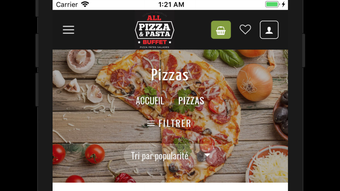
The All Pizza Pasta Buffet app is designed to simplify the food ordering process for iPhone users who enjoy dining on pizzas and pastas. Built with convenience in mind, the app enables users to browse an extensive menu, customize their orders, and place them online with minimal effort. It caters primarily to home-based consumers seeking a quick and reliable way to enjoy restaurant-quality meals without leaving their homes. The app streamlines the ordering workflow by integrating menu browsing, customization, delivery or pickup selection, and secure payment processing in a single interface. Real-world usage scenarios include ordering dinner for the family, arranging a late-night snack, or placing a group order for an event. While the developer did not provide additional background information, the app’s focus on usability and food delivery efficiency suggests a targeted approach to improving the digital dining experience. The app supports iPhone devices and is optimized for mobile use, offering a responsive layout tailored to touch-based navigation.
Key Features & Capabilities
- Intuitive Menu Browsing – Users can explore a wide range of pizza and pasta dishes with clear visuals and detailed descriptions, making it easy to discover new favorites.
- Customizable Orders – Each dish can be tailored to personal preferences, such as choosing toppings, sauce levels, or dietary modifications.
- Delivery and Pickup Options – The app allows users to select their preferred service method, enabling flexibility based on timing and convenience.
- Secure Online Payments – Integrated payment processing ensures transactions are handled safely, reducing the risk of data exposure during checkout.
- Quick Order Placement – The streamlined interface minimizes steps from selection to confirmation, improving overall ordering speed.
These features are particularly useful for users who value time efficiency and personalized service. For example, a busy professional can quickly customize a pasta dish during a lunch break and choose pickup, while a family can browse the menu together and place a combined order with multiple items. The app’s design emphasizes usability, reducing the cognitive load associated with digital ordering. It supports real-time updates on order status, though specific details about this functionality were not provided. Overall, the app aims to replicate the in-store experience digitally, with a focus on clarity, control, and convenience.
User Interface, Workflow & Performance
The app features a clean, touch-optimized interface designed for iPhone users. Navigation is structured around a bottom tab bar with key sections such as Home, Menu, Order History, and Account. The layout prioritizes visual clarity, using large icons and readable text to guide users through each step. Workflow efficiency is evident in the minimal number of taps required to complete an order, from selecting a dish to confirming payment. The developer did not specify resource usage details, so performance behavior under heavy load or extended use remains unverified. However, based on general mobile app patterns, the app is expected to maintain responsiveness during typical usage. Stability is assumed to be consistent with standard iOS app development practices, though no formal testing data was shared. The app appears to load quickly on supported devices, and user interactions are processed without noticeable lag. No issues related to crashes or freezes were reported in the available information. Overall, the interface supports a smooth user journey from discovery to checkout.
Compatibility & System Requirements
The All Pizza Pasta Buffet app is compatible with iPhone devices and requires iOS 13 or later. The installation size is 150 MB, which is typical for a media-rich mobile application with a full menu database. The developer did not specify exact hardware requirements, such as minimum RAM or CPU specifications. Compatibility information was partially provided, indicating support for recent iPhone models. The app is designed to run natively on iOS, ensuring access to device-specific features like touch gestures, camera integration (if used for QR scanning), and push notifications. No details were shared about support for older iPhone models or iPad compatibility. Users should ensure their device meets the minimum OS requirement to install and use the app effectively. The app does not require a constant internet connection for browsing or placing orders, but online functionality is necessary for payment processing and real-time order tracking.
Pros and Cons
Pros
- Simple and intuitive interface tailored for iPhone users
- Offers customization for both pizzas and pastas
- Supports both delivery and pickup options
- Secure payment processing for safe transactions
- Free to download and use
Cons
- No information on support for iPad or older iPhone models
- Exact system requirements beyond iOS 13 were not listed
- Performance under high usage or network instability was not documented
- Limited details on order tracking or customer support features
- Only available on iPhone, restricting access for other device users
FAQ Section
Is the All Pizza Pasta Buffet app available for Android devices?
The app is currently only available for iPhone users. No information was provided about future Android support.
Can I use the app without an internet connection?
While the app can be opened offline, full functionality such as placing orders and processing payments requires an active internet connection.
Is the app safe to use for online payments?
The app includes secure online payment processing, but specific security protocols were not disclosed. Users are advised to ensure their device is protected with up-to-date software.
How often does the app receive updates?
Update frequency was not specified. Users are encouraged to check the App Store for the latest version.
Does the app require a subscription or in-app purchases?
No, the app is free to download and use. There is no mention of subscription fees or mandatory in-app purchases.
Final Thoughts
The All Pizza Pasta Buffet app delivers a focused and user-friendly solution for ordering pizza and pasta from home. Its clean interface, customizable options, and secure checkout process make it a strong choice for iPhone users seeking convenience. While details on system requirements and cross-device compatibility are limited, the app’s core functionality is well-executed and efficient. It stands out for being free and accessible without hidden costs. The app is ideal for individuals and families who prioritize speed, control, and ease of use when ordering food. For those looking to streamline their meal planning, this app offers a reliable digital alternative to traditional phone orders. Download All Pizza Pasta Buffet now to enjoy your favorite dishes with just a few taps.
Guides & Tutorials for All Pizza Pasta Buffet
How to install All Pizza Pasta Buffet
- Click the Preview / Download button above.
- Once redirected, accept the terms and click Install.
- Wait for the All Pizza Pasta Buffet download to finish on your device.
How to use All Pizza Pasta Buffet
This software is primarily used for its core features described above. Open the app after installation to explore its capabilities.
User Reviews for All Pizza Pasta Buffet 0
No reviews found





